Lambda Labs 8: Week 5 Recap
Capstone Defense, Demo, and Video Script
Part 1 - Individual Accomplishments this Week
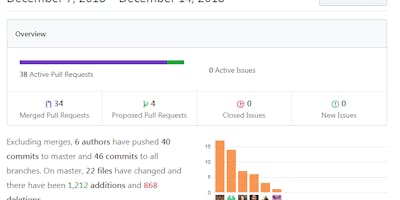
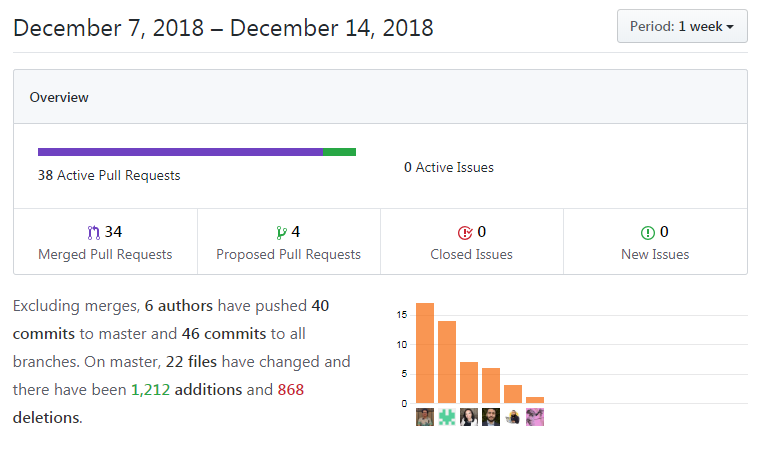
Paste your team’s github contribution graph here and indicate your Github Handle (m4rkh0ng) :
Provide a paragraph (5-8 sentences) summarizing the work you did this week, the challenges you faced, the tools you used, and your accomplishments
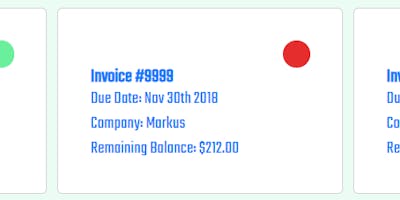
This week, I worked on some of the finishing touches to our application. This includes some CSS styling to our landing page's mobile view, adding our favicon and web title to replace the default "React App", adding fixes to the invoice card appearance and logic for displaying the paid status, formatting line items for mobile view, disabling fields for the edit form of the invoice maker (so that the the data input within the field remains as it should), and additional fixes to areas like the PDF dollar amounts (it would bring in decimal places after the hundredths place, which was undesirable). By the end of this week, I felt like I had accomplished a lot but also felt like I could have done more.
Time was a key factor and provided one of the challenges to this week indirectly. It kept seeming that there was more work to be done with each new pull request being merged; mostly additional features that I'd thought might be worth implementing. Some of it was focused on refactoring code to appear easier to read. I mostly used my Chrome DevTools and VSCode to accomplish the tasks for this week.
Tasks Pulled
List the tasks you pulled this week, and provide a link to the successfully merged PR completing that task and the trello card for that task. You must have at least one front end and one back end. The expected total is 6 with a minimum of 4.
Front End
Ticket 1: Favicon and Information in the Page's Tab
Github: https://github.com/Lambda-School-Labs/Labs8-AutoInvoicer/pull/107 Trello: https://trello.com/c/vBxSjXqI/157-change-the-favicon-and-information-in-the-pages-tab
Ticket 2: Fixed mobile style for landing page
Github: https://github.com/Lambda-School-Labs/Labs8-AutoInvoicer/pull/104 Trello: https://trello.com/c/ZkeE8ymd/111-styling-landing-page-not-currently-responsive
Ticket 3: Format Line Items Table for Mobile View
Github: https://github.com/Lambda-School-Labs/Labs8-AutoInvoicer/pull/117 Trello: https://trello.com/c/1J1FbHjn/159-format-line-items-table-for-mobile-view
Ticket 4: Changed logic for invoice card status
Github: https://github.com/Lambda-School-Labs/Labs8-AutoInvoicer/pull/123 Trello: https://trello.com/c/i7ohiXVs/101-redesign-invoice-cards-in-invoices-list
Ticket 5: Disabled fields for updating invoice form that shouldn't be changed
Github: https://github.com/Lambda-School-Labs/Labs8-AutoInvoicer/pull/127 Trello:
Ticket 6: Constrained to hundredths decimal place for dollar amounts
Github: https://github.com/Lambda-School-Labs/Labs8-AutoInvoicer/pull/128 Trello: https://trello.com/c/QDOP6mjk/167-constrain-all-dollar-amount-decimal-places-to-two-places-on-pdf
Ticket 7: Added functionality for deleting a line item
Github: https://github.com/Lambda-School-Labs/Labs8-AutoInvoicer/pull/133 Trello: https://trello.com/c/BhIlaX2h/170-add-ability-to-delete-a-line-item
Ticket 8: Refactored code for disabling fields on edit invoice form
Github: https://github.com/Lambda-School-Labs/Labs8-AutoInvoicer/pull/132 Trello: https://trello.com/c/DIg2SSke/139-lock-fields-on-invoice-which-dont-make-sense-for-user-to-change
Back End
N/A
Detailed Analysis
Pick one of your tickets and provide a detailed analysis of the work you did. This should be approximately ¼ page of text, and at least three screenshots.
https://github.com/Lambda-School-Labs/Labs8-AutoInvoicer/pull/117
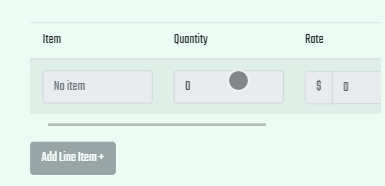
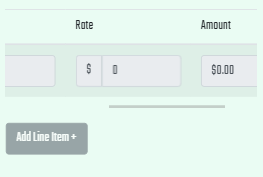
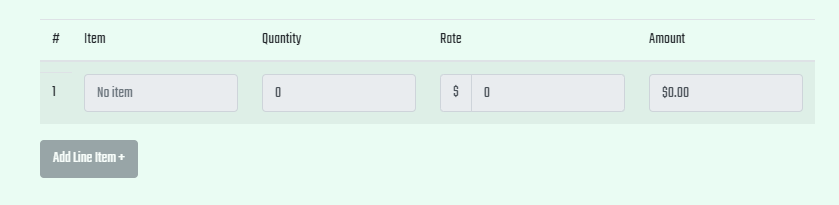
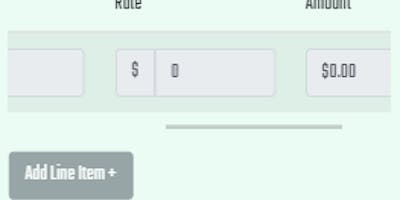
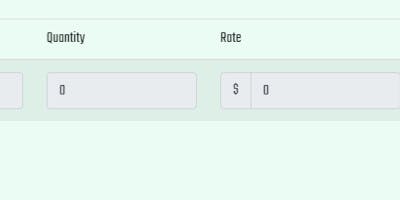
This week, one of the things that I had the opportunity to work on was solving our previous problem with the line items not being usable on mobile. Previously, the format from the desktop version had resized each of the inputs to be squished together, such that, on a mobile-sized viewport, the fields were not displaying any of the information to the user in a useful way (the fields were still functional, but typing in them did not lead to any visual feedback).
So, in order to resolve this, I'd thought of a few potential solutions. One of them that I was thinking about involved writing more JSX to map over the line items and have the keys of the values of the table written alongside each individual item that's added. This initial idea was to use flexbox and CSS to rearrange the table to have the keys be represented in a format that would stack these line items looking like "key : value" pairs in a vertical format, instead of how the table is set to flow horizontally from left to right.
This solution did not appeal to me after some further consideration, as the functionality of the line items form was already well-structured in its desktop format. Thus, I thought about how to represent that same desktop version of the table, but in a smaller width. The addition of a horizontal scrollbar and different widths/breakpoints were utilized to accomplish the same goal of having the fields be usable and still keeping the design of the page responsive.
Part 2 - Milestone Reflections
Put your response to the weekly question and a link to your team journal assignment here.
As a part of your journal entry, write ¼ to ½ a page reflecting on your experiences working with a team to bring an application to completion. The 90-90 rule is a quip referencing the very real difficulty of truly completing a project. Describe some of the final tasks that were the most difficult for your team to resolve - challenging bugs, layout and presentation woes, or anything else that was easy to get mostly working, but hard to get perfect
Working with my team, I felt like each of us was focused on delivering a quality product with our work on this application. I certainly felt the difficulty of certain challenges from the design or from existing code needing to be worked with instead of building a solution that worked from the ground up. I think that certain areas of functionality that were still buggy, like the invoice form potentially facing a problem that any user could potentially continually write and re-write their own invoice to effectively never have to purchase new credits. However, this was addressed and alleviated.
Other parts were easier to fix but surprising that they were still existing as outstanding issues, such as when the PDF was generating decimal places far beyond the hundredths place for currency. It's interesting to me how most of these issues came up within the later portion of working on our project.
For your project, provide in 350 words or less each:
The tech stack used to build the project:
The tech stack used to build our project is the MERN stack: Mongo, Express, React, and Node.
A description of the application:
Auto-Invoicer is an application that is used by small business owners to save and download PDF invoices to be recorded over time.
Also provide:
A link in the readme to a document that provides links for the location for all media files (images, etc.) on the sight, and evidence of the license for that media.
